

Hebrew source: https://mediak.co.il/guide-617
Custom audiences and lookalike audiences are tools for managing Facebook and Instagram campaigns. First-party customer data and good-quality signals can help the platform find relevant people. This guide explains the audience types, source quality, exclusions and checks involved.
Website custom audiences versus lookalike audiences
Website custom audience
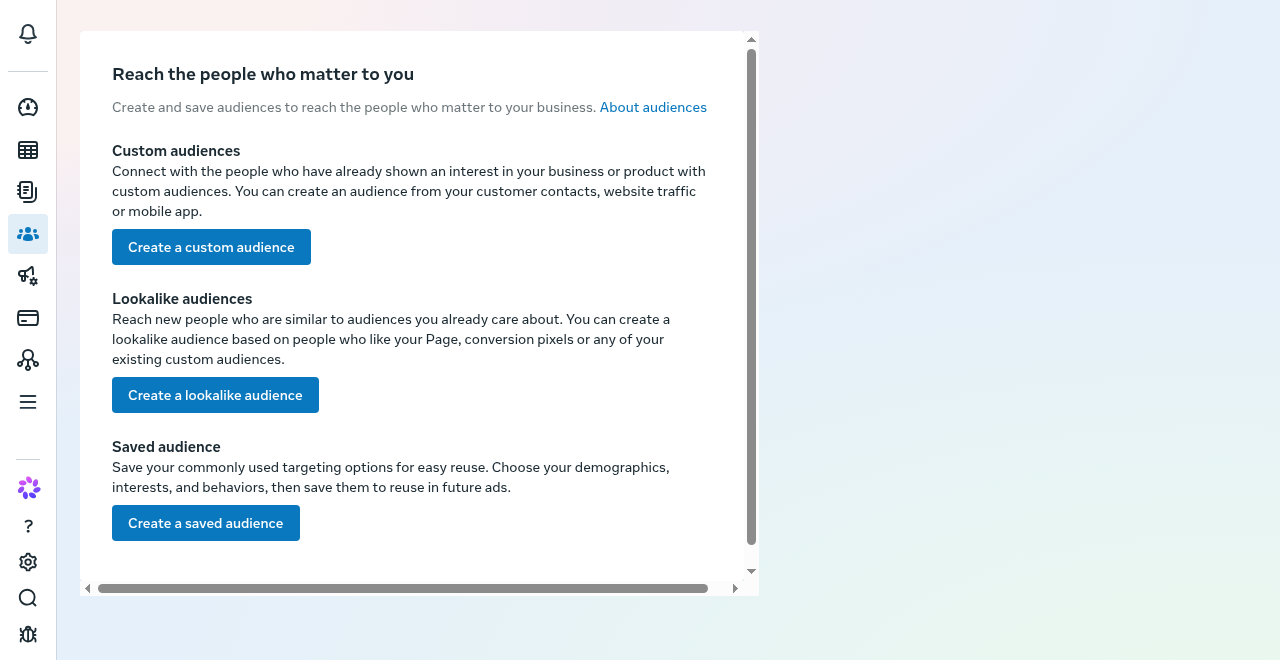
The Audiences overview illustrates three audience types. A lookalike finds similar people; it is not the same as retargeting the source audience.
A website custom audience, or WCA, consists of eligible people whose website activity is captured through Meta Pixel or Conversions API. It is based on recorded behavior, is limited by available audience data and changes as people enter or leave the selected retention window.
Lookalike audience
A lookalike audience consists of people Meta considers similar to a source audience, also called the seed. In the source guide's example, the selected percentage ranges from 1% to 10% of a country's eligible audience. A smaller percentage is intended to be closer to the source; a larger percentage broadens the potential audience.
Do not assume that a lookalike is permanently frozen when created. Specialist documentation describes automatic refresh of actively used lookalikes. Keep the source data current and review the audience's current status and settings in the account.
Choosing and segmenting source audiences
The source audience is a signal for the system. Its quality matters, not only its size.
Useful customer segments
The source guide suggests recent purchasers, such as customers from the last 12 months, or qualified leads who booked a call. Possible segments include buyers of a particular brand or product, subscribers versus one-off purchasers, and higher-spending customers.
Use customer data only where the business has the necessary rights and permissions for the intended advertising use.
Building sources from website events
Where website data is the source, the guide suggests starting with a broader event such as ViewContent and moving toward more specific behavior, such as AddToCart, sign-ups or purchases, as usable data accumulates.
Source size
A small source may not contain enough consistent information for a useful similarity model. One practitioner approach is aiming for about 1,000 good-quality people.
That is a practitioner recommendation, not a universal minimum for every audience type. A smaller list should not automatically be treated as ineligible. Check the account's actual eligibility requirements and the quality of the people represented.
If the source is too small or weak for the intended test, consider building more useful customer data first. Retargeting can be one option where a usable audience already exists; it is not a guaranteed way to grow a small customer list.
Uploading CSV files and connecting a CRM
Customer or lead files can be uploaded through the available custom audience workflow. A CRM connection can help keep eligible customer data current, including updates and removals where the integration supports them.
A Conversions API connection is not automatically the same as a CRM audience sync. Check which information each integration sends and whether it actually updates the selected audience source.
Choosing the lookalike percentage
One practitioner approach is testing a 1% lookalike first and observing performance over a meaningful period, using about 14 days as an example.
A broader 2% or 3% audience can be tested if cost per lead or conversion remains acceptable. Expanding toward 10% broadens similarity criteria; it does not by itself establish that the audience has no value or that results must worsen.
These are testing suggestions rather than fixed platform rules. Account for budget, conversion volume and reporting delay.
Excluding existing customers
For a campaign intended to acquire new customers, review whether existing purchasers should be excluded through custom audience controls. The source guide uses purchasers from the last 30 days as an example.
An exclusion window should match the business's acquisition definition and repeat-purchase cycle. It is not a universal requirement to exclude every previous customer from every campaign.
Periodic audience review
Review source quality, customer-list freshness, permissions and campaign performance regularly. A quarterly review can be a useful operating habit.
Do not delete functioning lookalikes automatically just because three months have passed. Automatic audience refresh and updating a source customer file are different processes. If a replacement audience is needed, plan the change, use clear names and check campaigns that depend on the old audience before removing it.
Practical checks
Broad but weak source data
A source of all website visitors or general engagement may include many people who are not customers. Compare it with more qualified sources rather than assuming every visitor is a useful acquisition signal.
Audience fatigue
Watch frequency, cost and downstream results. Long-running audiences can show fatigue, but age alone does not prove that an audience has stopped working.
New customers versus retargeting
Separate acquisition and retargeting results when judging performance. Retargeting can report a higher ROAS because those people already know the brand. Combining the results can hide weak new-customer acquisition.
Broadening percentages to solve low delivery
Increasing a lookalike percentage broadens its reach. It does not repair weak creative, poor source quality, tracking problems or an unsuitable offer.
Source for the refresh correction
Jon Loomer, "How Often Do Lookalike Audiences Update?", published 16 September 2023, inspected 9 November 2026. This specialist source describes refresh every 3 to 7 days for actively targeted audiences. That historical interval is not a current account-wide guarantee.