

Hebrew source: https://mediak.co.il/guide-609
Meta's advertising system uses extensive automation under Advantage+. Using those settings without reviewing them can send budget to audiences that do not fit the business. This guide explains how to distinguish actual audience limits from suggestions and how to check the controls available in your account.
Audience controls versus audience suggestions
Advantage+ audience distinguishes between controls and suggestions.
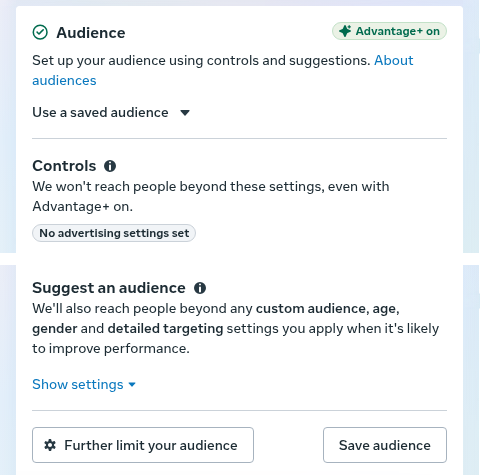
This example separates audience controls from suggestions while Advantage+ is on. It is not evidence that every account offers the same age or targeting limits.
Audience controls are the limits the interface identifies as restrictions. Depending on the campaign and account, these can include locations, minimum age, languages and custom audience exclusions.
Audience suggestions guide delivery but may allow Meta to reach beyond them. They can include interests, gender, age preferences and included custom audiences. Do not assume a selection is a strict restriction simply because it appears in the audience form.
For example, if gender is being used only as a suggestion, selecting women does not necessarily prevent delivery to men.
One documented Advantage+ configuration used minimum ages of 18 to 25 and a maximum-age setting of 65. These should not be treated as permanent limits for every account. Read the controls actually shown in your campaign, including any option to apply further limits.
Limiting an audience while Advantage+ audience is enabled
1. In the audience section, choose Further limit your audience or Further limit the reach of your ads.
2. Select the available restrictions for age, gender, custom audiences or detailed targeting.
3. If a setting is marked as a suggestion, review Use as a suggestion. Clear that option where the interface allows you to apply the selection as a restriction.
Opening the controls does not by itself turn Advantage+ audience off. Removing a setting's suggestion status can affect whether Advantage+ remains enabled.
One documented account did not offer the literal button Switch to original audience options. Interfaces vary. Special ad categories, including politics and elections, may not receive every option. Treat settings as suggestions until the interface confirms otherwise.
Testing individual interests with ad set budgets
A testing approach is the following testing method:
- Use one interest per ad set.
- Run the same ads across the ad sets being compared.
- Group test ideas by theme, such as competing brands, retailers, hobbies or television programs.
- Its suggested starting budget is 1.5 to 3 times the target CPA for about three days per ad set.
Those budget and time figures are practitioner rules of thumb, not Meta requirements or reliable stopping rules for every business. Review conversion volume, reporting delay and business economics before ending a test.
Custom audience exclusions
Excluding existing customers can help keep a new-customer campaign focused on acquisition.
The source recommends using a recent purchaser audience, such as purchasers from the last 7 to 30 days, and placing it in the account's custom audience exclusion controls. The source can be a customer list or an eligible website audience built from Pixel or Conversions API activity.
Do not confuse custom audience exclusions with detailed targeting exclusions. Meta's removal of detailed targeting exclusions does not mean that every type of customer exclusion has also disappeared. Check the actual controls in the selected campaign.
Match targeting decisions to the performance goal
For purchase campaigns, automated delivery seeks people likely to complete the chosen purchase action. The system may expand beyond suggestions where the configuration allows it.
For traffic and lead campaigns, cheap clicks or leads are not the same as qualified customers. Review age and gender breakdowns, lead quality and downstream outcomes. If the business needs a strict restriction, make sure it is being applied as a control rather than a suggestion.
Common problems and checks
Saved audiences that have become suggestions
When reusing a saved audience, check whether age, gender or other selections are now suggestions under Advantage+ rather than the restrictions used in an earlier campaign.
Budget concentrated in cheap but weak leads
Review age and gender breakdowns alongside actual lead quality. An inexpensive lead from a demographic group is not necessarily useful to the business, and an age-based assumption is not a substitute for measured outcomes.
Controls unavailable for a particular objective
Some campaign types do not offer every targeting switch. The source gives Messenger campaigns as an example. Where a required control is unavailable, consider qualifying questions or a different objective that still matches the business goal.
Interests removed or merged
Meta changes its interest categories. Review old saved audiences for selections that have been removed, combined or changed rather than assuming an old audience remains identical.
Ignoring creative's role in delivery
The system also uses the ad's text, video and message to predict relevance. Tight targeting alone will not make generic or unsuitable creative reach the right people.