
Hebrew source: https://mediak.co.il/guide-601
Setting up a paid campaign in Meta, across Facebook and Instagram, involves many prompts to use full automation. This guide explains how to build a campaign in a controlled way and make informed decisions about budget, audiences and creative according to the campaign's objective.
Choosing the campaign objective
The objective directs the system toward the action you want people to take.
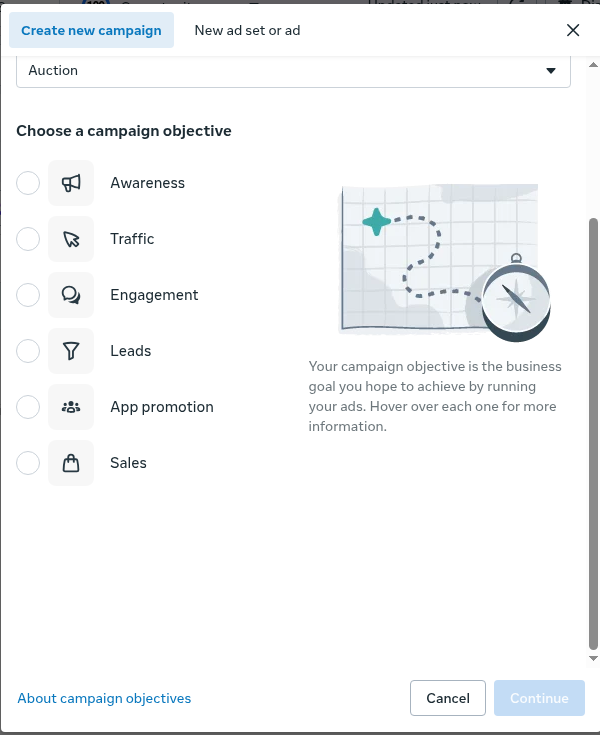
Example objective choices in Meta Ads Manager. Choose the objective that matches the outcome being measured.
For businesses seeking sales and other business outcomes, one practitioner approach is optimizing for conversions or sales rather than traffic or link clicks. A traffic objective focuses on bringing in clicks from people likely to click links. A conversion objective directs delivery toward people considered more likely to complete the selected conversion action.
Budget and account structure: ABO versus CBO
Budget settings let you test different campaign components at different stages.

The three management levels in Ads Manager. Budget placement and available controls depend on the selected setup.
Testing with ad set budgets
One practitioner approach is starting with Ad Set Budget Optimization (ABO), so each ad set has its own budget. It suggests allowing each ad set to accumulate exposure, for example 500 to 1,000 impressions, before making budget decisions. These figures are testing examples, not platform requirements or proof that a test has enough conversion data.
Scaling with campaign budgets
Campaign-level budgeting, also called CBO or Advantage campaign budget, is presented as an option when the ad sets have already shown balanced or profitable performance. The system allocates money between ad sets as delivery develops. Using CBO too early in a test can concentrate spending on an ad set that happened to produce an early result.
Audiences and Advantage+ settings
A testing approach is using manual or original audience options during testing where the account offers them. This is intended to keep control over the data and audiences being tested.
Excluding previous purchasers
For campaigns intended to reach new customers, the guide recommends excluding a recent purchaser audience, such as purchasers from the last 30 days.
A staged ecommerce example
The following staged approach is an example, not a platform requirement:
1. Start with a traffic campaign focused on product-page views, using demographic and interest settings.
2. After about 500 visitors, build a website custom audience and test a conversion campaign optimized for add-to-cart, using a lookalike audience.
3. After about 100 add-to-cart events, test purchase optimization using a lookalike of people who added to cart.
4. After about 100 purchases, create a purchaser lookalike for another conversion campaign.
5. Once there is a larger volume of purchases, such as 500, consider testing automated Advantage+ Shopping campaigns.
These are the source author's illustrative milestones, not Meta eligibility requirements. They are not a reason to select traffic when the business needs purchases, and they do not override the objective-selection advice above. Campaign types and controls available in the account must be checked before applying the example.
Choosing placements for the campaign objective
For conversion campaigns, the guide recommends keeping Advantage+ placements enabled so the system can seek conversions within the budget. Restricting placements can increase CPM.
For traffic or view campaigns, the guide suggests testing manual placements and considering whether Audience Network should be excluded. It notes that some external-network clicks may be low quality. Manual placement options are configured at ad set level, and availability can vary.
Creative and automatic enhancements
Meta offers automatic creative enhancements, including cropping for placements, brightness changes, music and text variations.
When testing creative precisely or protecting a strict brand style, consider reviewing or disabling the relevant enhancements in the Enhancements controls and Advanced preview. This helps distinguish the performance of the original creative from changes made by the platform and makes A/B tests easier to interpret.
Attribution window
The attribution window determines which conversions Meta can credit to an ad.
A common setup described in practitioner guidance is 7-day click and 1-day view. Selecting a click-only window, such as 7-day click or 1-day click where offered, lets you examine attributed conversions without including view-through conversions. Check the settings actually available in the account rather than assuming every campaign uses the same default.
Practical checks before making decisions
Check traffic quality by placement
When using Audience Network or broad placements, examine website behavior, including time on site and bounce rate. Cheap clicks do not by themselves show useful downstream activity.
Review the effect of creative enhancements
Automatic enhancements can help some ads but can also change their appearance or make a clean comparison between versions harder. Review the final previews, not only the uploaded file.
Investigate high CTR without conversions
A high click-through rate with no sales or leads is a reason to check:
- Pixel and Conversions API tracking.
- The ad set's optimization goal.
- Audience and placement settings.
- The offer, price, landing page and website experience.
The guide is based on advertisers' practical experience and professional sources. Interfaces and available controls can differ between accounts.