
Hebrew source: https://mediak.co.il/guide-593
Setting up advertising infrastructure in Meta (Facebook and Instagram) is based on creating well-defined business assets. This guide will walk you through step by step in setting up the infrastructure in a correct and orderly manner.
Setting Up Business Manager (Business Portfolio)
The first step is creating a Business Manager account at business.facebook.com. Centralizing assets in the business portfolio enables orderly management and convenient access to all business assets.
Implementation Steps:
Navigate to business.facebook.com.
Click on "Create Account".
Enter the business name, full name, and business email address.
Business Verification and Domain Verification
Business verification and domain verification are separate processes. Meta says not all businesses need, or have the option, to complete business verification. It is required for certain products and features. An eligible portfolio owner with full control can start the process in Security Center. This is different from the paid Meta Verified subscription and does not itself provide a verified badge. Sources:https://www.facebook.com/business/help/1095661473946872 andhttps://www.facebook.com/business/help/2058515294227817
Prepare the legal business name, address, phone number and website exactly as registered. Meta requires the verification-flow website to load over HTTPS. Official documents may be requested if records cannot be matched; they are not always required in the same form. Connection methods can include email, phone, text, WhatsApp or domain verification. A company-domain email is therefore not a universal prerequisite for every verification route. Follow the options actually offered. Source:https://www.facebook.com/business/help/2058515294227817
Domain verification: Meta lists three methods: an HTML meta tag, an HTML file uploaded to the root directory, or a DNS TXT record. Its instructions require a business portfolio, full control of it and admin/developer access to the domain. Use the root domain without a prefix. Source:https://www.facebook.com/business/help/321167023127050
Data Matching: It is recommended that all details in Business Manager match the official business documents (business name, address, and phone number). If a specific option does not appear in the expected location, it may appear under a slightly different menu in Business Settings.
Opening a Business Ad Account
A new ad account is created from within Business Manager. The account-settings screen for an existing account is different from the flow for creating a new ad account. Use the current creation controls in the business portfolio.
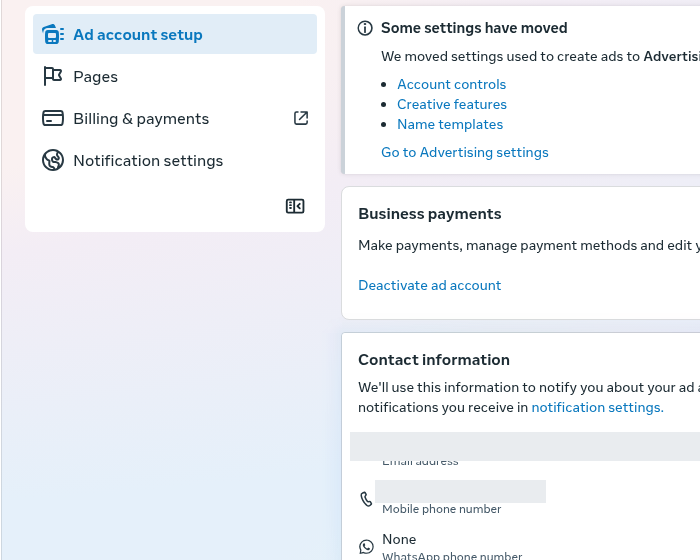
Settings for an existing ad account, not the creation flow. The crop shows a notice that some advertising settings have moved; contact values are obscured.
Key Points for Account Setup:
Setting the correct time zone, appropriate currency, and a clear account name.
New portfolios may have account-creation limits. Read the limit and eligibility shown in the account rather than assuming that one successful payment automatically unlocks another ad account.
Creating and Linking a Business Facebook Page
Create or connect the appropriate business Page, complete its business details and keep brand identity consistent. Provide the privacy, contact and other legal information required for the website and advertising use.
Setting Up Payment Methods
An updated and valid payment method is essential for continuous activity.
Recommendations for Setting Up Payment Methods:
Use a payment method supported by the ad account's country, currency and billing setup. The source recommends a business card or company-linked PayPal account, but these are examples rather than universally available or mandatory methods.
It is recommended to set up a secondary payment method as a backup to prevent billing interruptions.
Account Security and Permission Settings
Proper security protects the account and ensures management continuity:
Enabling two-factor authentication (2FA) for all users in the account.
Appointing at least one additional administrator (Admin) as a backup.
Assign the access needed for each person's job, separating campaign management, viewing and full control. Review current portfolio and asset permissions rather than assuming one role label grants the same access everywhere.
Phased Onboarding Process
When launching initial campaigns, it is recommended to start with low budgets and simple campaign types, testing reporting and billing functionality before expanding activity.
Important Points to Know When Working with the System
Account limits: follow the account-specific notice and supported help route. Payment history can be relevant to some features, but paying does not guarantee a particular creation or spending limit.
Security Checks and Billing Delays: If a message appears regarding a billing issue or a need for payment method verification, it is recommended to verify that card details are accurate and contact Meta Support if necessary.
If a security check appears, follow the official verification flow. Review account access and browser extensions, but do not infer the exact reason for a check from the fact that it appeared.
Maintaining Administrative Permissions: It is important to ensure that at least one active user holds full administrator (Admin) permissions in the business portfolio to prevent loss of access to settings and billing.
Data Security and External Inquiries: Meta is the sole authority in managing accounts and permissions. Do not share login credentials, codes, or passwords with external entities.
The guide is based on practical field experience of advertisers and various professional sources, and the interface may vary slightly between accounts.