
Hebrew source: https://mediak.co.il/guide-569
Introduction
Installing conversion tracking in TikTok is not just copying and pasting a short code snippet into the header of the website. Advertisers and consultants in the field warn that relying solely on the browser-based Pixel leads to extensive data loss as a result of ad blockers, privacy restrictions in browsers, and closing tabs before the script loads. Conversely, sending the same conversion through the browser Pixel and Events API without working deduplication can cause duplicate counting and distort reporting. This guide is based solely on documented experience from advertisers, consultants, and agencies in the field, and presents the practical steps for setting up a reliable tracking infrastructure.
Why use Pixel and Events API together?
Browser measurement can miss events because of blockers, consent choices, browser restrictions or loading failures. Events API provides a server-side channel. Use the two together with correct event matching and deduplication where appropriate; server-side collection does not bypass privacy obligations or guarantee complete measurement.
Deduplication Rules
For the same web action sent through Pixel and Events API, use the same data-source identifier, event name and event_id. The Events API parameter reference lists event_id as required for this dual-channel setup. Source:https://business-api.tiktok.com/portal/docs/parameters/v1.3
Pixel Code: An identical pixel/data source identifier across both channels.
Event Name: An identical event name (case-sensitive).
Event ID (event_id): A unique, identical identifier sent across both channels.
event_time records when the action occurred, as a Unix timestamp in seconds. It is separate from the event_source_id, event and event_id matching keys. Source:https://business-api.tiktok.com/portal/docs/parameters/v1.3
Time Windows for Merging and Filtering Events
For matched browser and server events, the deduplication documentation describes these receiving windows. They assume the same underlying action and identifiers, not merely two purchases by the same person:
Less than 5 minutes between events: The system merges the events (Merged) and enriches the data. Fields missing from the browser event are completed from the server event.
Between 5 minutes and 48 hours: The second incoming event is dropped (Dropped) in a pure filtering process.
Over 48 hours: The second event is counted as a completely separate conversion, leading to double counting.
Numbered Steps for Setting Up End-to-End Tracking
Use the current Events Manager setup flow and the documentation for the chosen integration:
Create or select the intended web data source in Events Manager. Confirm its identity and permissions before connecting tags or integrations.
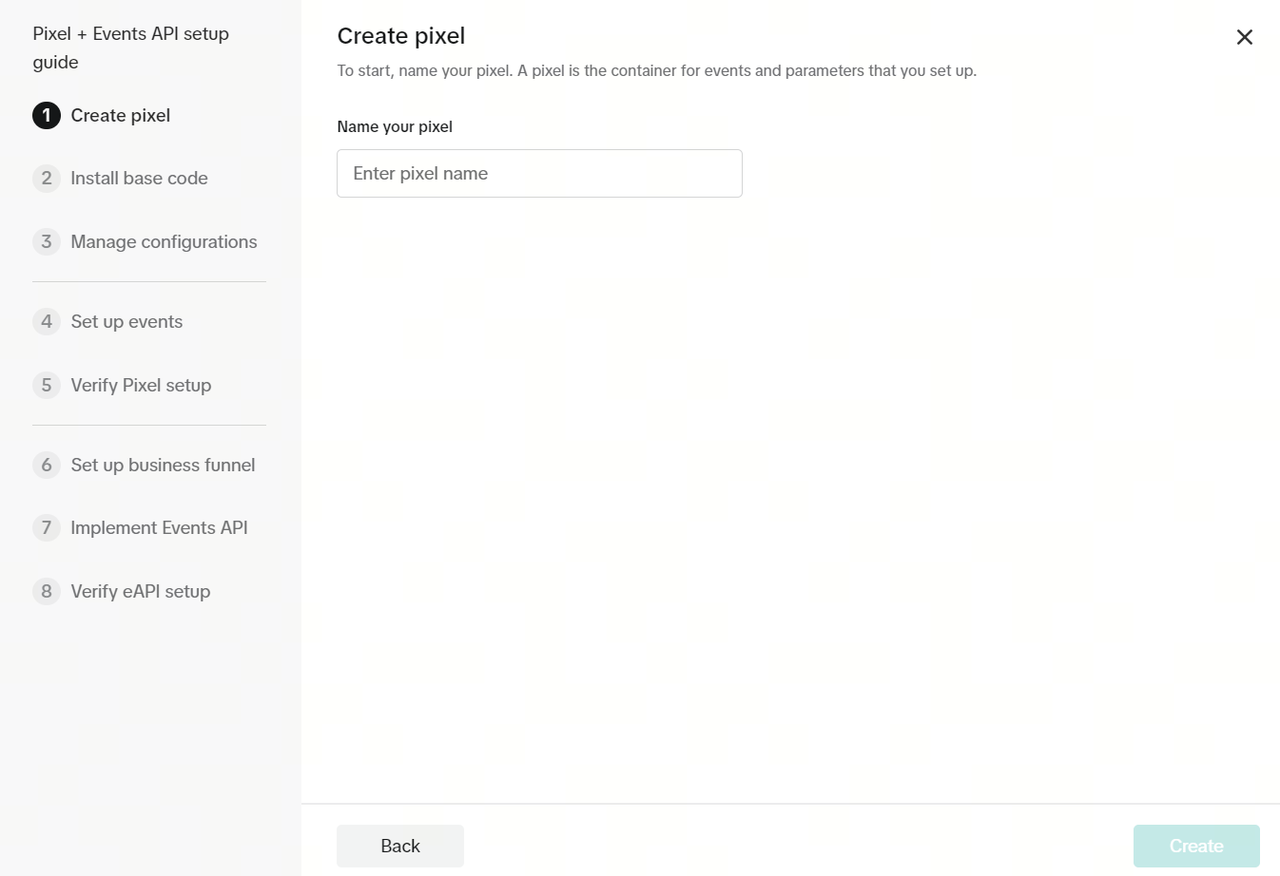
Example of the pixel-naming step. Follow the options currently available for the intended web data source.
Choosing the Installation Method: Partner Integration for Shopify, WooCommerce, or Google Tag Manager, or Manual Setup.
Install the Pixel base code using the chosen supported method. Check for existing integrations first so that an app and a manual tag do not collect the same action unintentionally.
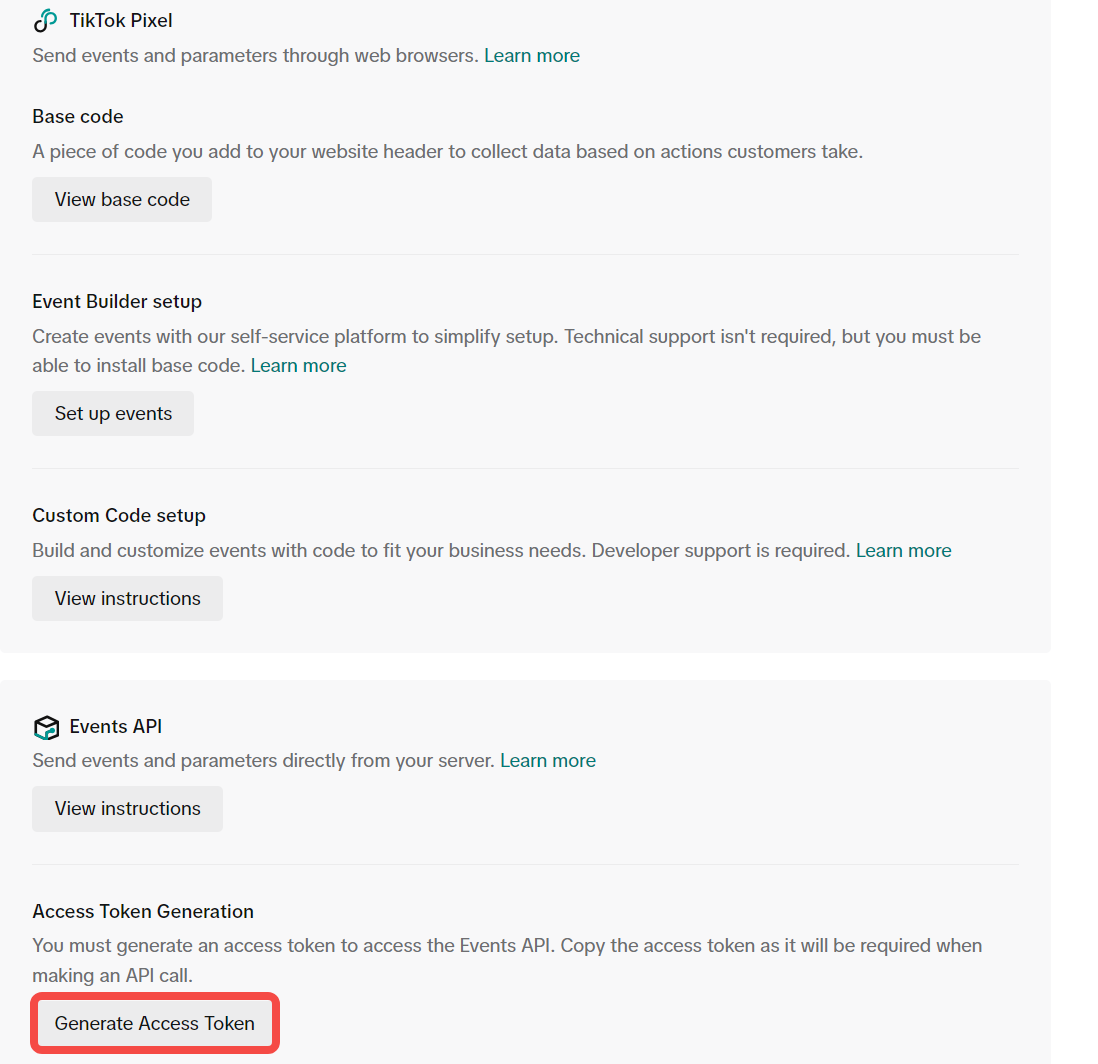
An example setup screen offering browser and server-side paths. Choose the supported integration for the site; the image does not mean every setup requires manual code.
Updated standard event names: TikTok confirms that Web, Offline and CRM updates took effect on May 1, 2025; app changes followed separately. CompletePayment became Purchase and SubmitForm became Lead. Existing code remains supported, while new Pixel setups should use the new names. ClickButton and PlaceAnOrder are soft-deprecated, supported until their 2027 sunset. Do not rename existing implementations merely because the reporting labels changed. Source:https://ads.tiktok.com/help/article/how-to-adopt-tiktoks-updated-standard-events
Custom web events: TikTok's official help, updated November 2026, permits at most 50 characters: alphabetic letters, Arabic numerals, underscores and dashes. The name must start with a letter and must not conflict with a standard or reserved event name. Custom web events support reporting and audience creation, not campaign optimization. App-event eligibility is a separate topic. Source:https://ads.tiktok.com/help/article/custom-events
Setting Parameters and Advanced Matching:
content_type accepts product or product_group. Choose the value matching the catalog identifier being sent. Source:https://business-api.tiktok.com/portal/docs/parameters/v1.3
value is the total order value, formatted as an integer or decimal without currency symbols, letters or commas. Use 1299.00 rather than $1,299.00. Source:https://business-api.tiktok.com/portal/docs/parameters/v1.3
For matching data sent through Events API, normalize email addresses and phone numbers as documented, then SHA-256 hash them. Phone numbers use E.164 normalization. Use only data that the business is entitled to process and share. Source:https://business-api.tiktok.com/portal/docs/parameters/v1.3
Review server-side matching fields explicitly. TikTok recommends sending ip and user_agent to improve matching; do not assume the server integration automatically receives the same browser context. Source:https://business-api.tiktok.com/portal/docs/parameters/v1.3
Connecting Events API and event_id: use an identifier for the actual action, such as purchase_1001, and send the same identifier in the browser and server event. TikTok lists event_id as required when sending web events through both channels. Cookie and click identifiers improve matching where available; the API describes ttp and ttclid without marking either universally required for all web events. Follow consent and applicable data-use rules. Source:https://business-api.tiktok.com/portal/docs/parameters/v1.3
Testing and Verification Before Flowing Budget: Testing setup via the TikTok Pixel Helper 2.0 browser extension. Verification in the Test Events tab in Events Manager - filtering between browser and server events and verifying that both bear the same event_id.
Errors Reported by Advertisers
Advertisers and agencies point to several critical setup failures:
Missing or mismatched event_id can prevent reliable deduplication when the same action is sent twice. TikTok requires event_id for dual-channel web setups; a limited browser-first cookie fallback is not a substitute for implementing the required identifiers. Source:https://business-api.tiktok.com/portal/docs/event-deduplication/v1.3
Delaying server event transmission beyond 48 hours: Fakhri warns that sending server events in daily or weekly batches crossing the 48-hour window causes the second event to be counted as a new conversion.
Invalid numeric formatting can prevent useful processing. Check value, currency and product identifiers against the API schema before judging reported revenue. Source:https://business-api.tiktok.com/portal/docs/parameters/v1.3
Cookie configuration affects the matching signals available to the integration. Review the consent and cookie settings for the actual setup rather than assuming one missing setting affects every event identically.
Multiple installation paths can send duplicate copies. Audit partner integrations, browser tags and server events together, then verify that the same action carries the same event_id.
Where a TikTok click ID is available, preserve and send it through the supported integration. Its validity follows the selected click-through attribution window. Source:https://business-api.tiktok.com/portal/docs/parameters/v1.3
Where Sources Differ or Are Unclear
1. Ads Manager Interface Issues and Activation Times for a New Pixel
TikTok's troubleshooting guidance advises checking permissions, confirming that the optimization event exists, triggering it if needed, allowing up to 10 minutes for count updates and up to 2 hours for processing and campaign eligibility. This is troubleshooting guidance, not a promise that every setup issue resolves after waiting. Persistent problems need further diagnosis or support. Source:https://ads.tiktok.com/resources/help/article/how-to-troubleshoot-pixel-visibility-in-tiktok-ads-manager
2. Event Match Quality (EMQ) Score
TikTok describes EMQ as a weighted average of match-key coverage. The diagnostic page read does not establish a universal target such as 8+. Review missing and valid matching fields instead of relying on an unsupported score guarantee. Source:https://ads.tiktok.com/help/article/tiktok-events-manager-monitor-and-diagnose
3. Reporting Discrepancies vs. Google Analytics (GA4)
Comparing TikTok with GA4 requires matching event definitions, reporting dates, attribution windows and report scope. Google distinguishes user-, session- and event-scoped traffic dimensions: user/session dimensions use paid-and-organic last-click attribution, while event-scoped reporting uses the selected model. GA4 is therefore not simply a single-session conversion model. Investigate missing events and UTM handling separately from differences in attribution; a discrepancy is not proof that implementation is correct. Primary sources:https://support.google.com/analytics/answer/11080067?hl=en andhttps://support.google.com/analytics/answer/10597962?hl=en